










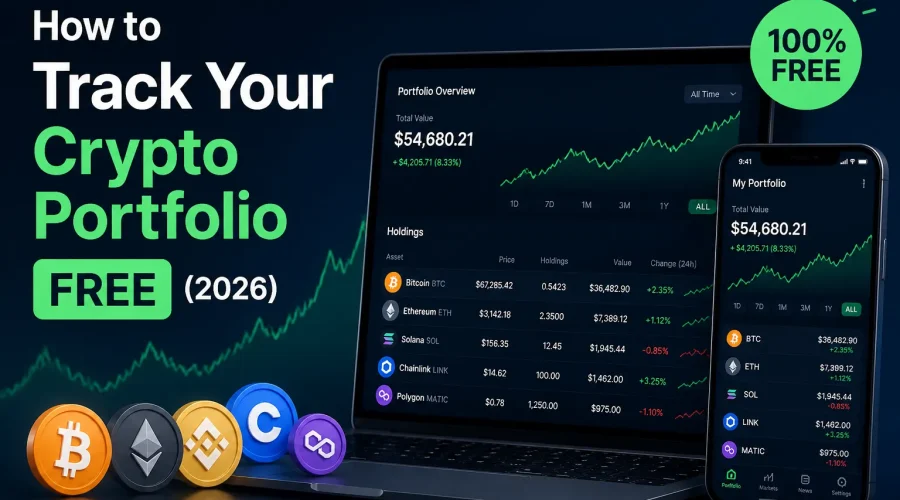
কয়েক বছর আগে, আপনার ক্রিপ্টো ট্র্যাক করা সহজ ছিল: যেকোনো একটি এক্সচেঞ্জ থেকে কিছু বিটকয়েন কিনুন, দিনে একবার দাম দেখুন। ২০২৬ সালে, বাস্তবতা অনেক বেশি জটিল। আপনার হয়তো কয়েনবেসে কয়েন, একটি ডিফাই প্রোটোকলের মাধ্যমে স্টেক করা টোকেন, সোলানাতে এনএফটি এবং আপনার ডেস্কের ড্রয়ারে একটি হার্ডওয়্যার ওয়ালেট থাকতে পারে। একটি সঠিক ট্র্যাকিং সিস্টেম ছাড়া, আপনার কী আছে তা মনে রাখাই প্রায় অসম্ভব, আপনি আসলে লাভে আছেন নাকি লোকসানে, তা তো দূরের কথা।
বিনামূল্যে আপনার ক্রিপ্টো পোর্টফোলিও ট্র্যাক করতে: (1) CoinMarketCap, CoinGecko, বা CoinStats-এর মতো একটি বিনামূল্যের ট্র্যাকার বেছে নিন। (2) API-এর মাধ্যমে আপনার এক্সচেঞ্জ অ্যাকাউন্টগুলি সংযুক্ত করুন অথবা আপনার ওয়ালেট ঠিকানা লিখুন। (3) প্রয়োজনে ম্যানুয়ালি আপনার হোল্ডিং যোগ করুন। (4) একটি ড্যাশবোর্ড থেকে আপনার মোট ব্যালেন্স, লাভ/ক্ষতি এবং অ্যাসেট অ্যালোকেশন নিরীক্ষণ করুন। 2026 সালে বেশিরভাগ ফ্রি টায়ার কোনো সাইনআপ ফি ছাড়াই সীমাহীন হোল্ডিং ট্র্যাকিং সমর্থন করে।
এই নির্দেশিকাটিতে একজন নতুন ব্যবহারকারীর জানার জন্য প্রয়োজনীয় সবকিছু রয়েছে: একটি ক্রিপ্টো পোর্টফোলিও ট্র্যাকার আসলে কী কাজ করে, ২০২৬ সালে কোন বিনামূল্যের টুলগুলো ব্যবহার করার মতো, আপনার কী ট্র্যাক করা উচিত (এবং কেন এটি গুরুত্বপূর্ণ), ধাপে ধাপে সেটআপ করার নির্দেশিকা, এবং নতুনদের এড়িয়ে চলার মতো সবচেয়ে সাধারণ ভুলগুলো। আপনি বিনামূল্যের টুলটিও ব্যবহার করতে পারেন। ক্রিপ্টো পোর্টফোলিও ট্র্যাকার এখনই শুরু করতে।
ক্রিপ্টো পোর্টফোলিও ট্র্যাকার কী?
একটি ক্রিপ্টো পোর্টফোলিও ট্র্যাকার এটি এমন একটি টুল যা আপনার সমস্ত ক্রিপ্টোকারেন্সি হোল্ডিংকে একটি একক ড্যাশবোর্ডে নিয়ে আসে, যাতে আপনাকে পাঁচটি ভিন্ন অ্যাপে লগ ইন করে নিজে হিসাব করার ঝামেলা ছাড়াই আপনার মোট ব্যালেন্স, প্রতিটি কয়েনের পারফরম্যান্স, লাভ-ক্ষতি এবং অ্যাসেট অ্যালোকেশন দেখতে পারেন।
এটিকে আপনার ডিজিটাল সম্পদের জন্য একটি ব্যক্তিগত আর্থিক ড্যাশবোর্ড হিসেবে ভাবুন। আলাদাভাবে কয়েনবেস, তারপর বাইন্যান্স, এরপর আপনার মেটামাস্ক ওয়ালেট চেক করার পরিবর্তে, একটি ট্র্যাকার সবকিছুকে একত্রিত করে একটি লাইভ ভিউতে দেখায়।
একটি ভালো ট্র্যাকার আপনাকে যা দেখায়
- মোট পোর্টফোলিও মূল্য: আপনার স্থানীয় মুদ্রায় আপনার সম্পূর্ণ ক্রিপ্টো নেট ওর্থ, যা রিয়েল টাইমে আপডেট করা হয়।
- প্রতিটি মুদ্রার কর্মক্ষমতা: আপনার কেনার পর থেকে প্রতিটি হোল্ডিং-এর কী পরিবর্তন হয়েছে, ডলারের হিসাবে এবং শতাংশ হিসাবে উভয়ই।
- বাস্তবায়িত এবং অবাস্তবায়িত লাভ-ক্ষতি: বিক্রি করে আপনি ইতিমধ্যে কী নিশ্চিত করেছেন, এবং কাগজে-কলমে আপনার বর্তমান লাভ বা ক্ষতি কেমন দেখাচ্ছে।
- সম্পদ বণ্টন: আপনার পোর্টফোলিওর কত শতাংশ প্রতিটি মুদ্রার প্রতিনিধিত্ব করে, যা ঝুঁকি ব্যবস্থাপনার জন্য অত্যন্ত গুরুত্বপূর্ণ।
- লেনদেনের ইতিহাস: আপনার সমস্ত অ্যাকাউন্ট জুড়ে প্রতিটি ক্রয়, বিক্রয়, স্থানান্তর এবং অদলবদলের একটি লগ।
- ব্যয় ভিত্তি: প্রতিটি মুদ্রার জন্য আপনি প্রাথমিকভাবে কত টাকা দিয়েছিলেন — যা সঠিক লাভ-ক্ষতি এবং করের দায় গণনার জন্য অপরিহার্য।
|
২০২৬ সালে আপনার ক্রিপ্টো পোর্টফোলিও ট্র্যাক করা কেন আরও বেশি গুরুত্বপূর্ণ
ক্রিপ্টো পোর্টফোলিও ট্র্যাক করা আগে ঐচ্ছিক ছিল। ২০২৬ সালে, তিনটি প্রধান কারণে এটি প্রায় অপরিহার্য হয়ে উঠেছে:
১. কর প্রতিবেদন এখন বাধ্যতামূলক এবং স্বয়ংক্রিয়
২০২৬ সাল থেকে, মার্কিন কেন্দ্রীভূত এক্সচেঞ্জগুলোকে ইস্যু করতে হবে ফর্ম ১০৯৯-ডিএপ্রতিটি ক্রিপ্টো বিক্রির তথ্য সরাসরি আইআরএস (IRS)-কে জানানো হয়। এর মানে হলো, কর কর্তৃপক্ষের কাছে আপনার তথ্য আগে থেকেই আছে। যদি আপনার ব্যক্তিগত রেকর্ড আপনার এক্সচেঞ্জের রিপোর্টের সাথে না মেলে, তাহলে আপনি জরিমানার সম্মুখীন হতে পারেন। এমন একটি ট্র্যাকার যা আপনার ক্রয়মূল্য এবং প্রতিটি লেনদেন রেকর্ড করে, তা এখন শুধু ঐচ্ছিক কোনো বিষয় নয়, বরং কর সংক্রান্ত একটি অপরিহার্য প্রয়োজন।
২. পোর্টফোলিওগুলো একাধিক প্ল্যাটফর্মে ছড়িয়ে আছে
আর্বিট্রাম ও বেসের মতো লেয়ার-২ নেটওয়ার্ক, ডিফাই প্রোটোকল, এনএফটি মার্কেটপ্লেস এবং একাধিক এক্সচেঞ্জের কারণে অধিকাংশ সক্রিয় ব্যবহারকারীর সম্পদ রয়েছে ৫টিরও বেশি অবস্থানট্র্যাকার ছাড়া আপনার প্রকৃত মোট সম্পদ—বা আপনার আসল লাভ—হিসাব করা প্রায় অসম্ভব।
৩. আবেগতাড়িত সিদ্ধান্ত গ্রহণে অর্থের অপচয় হয়।
যখন আপনার কাছে সঠিক ডেটা থাকে না, তখন আপনি অনুমানের উপর ভিত্তি করে সিদ্ধান্ত নেন। সামগ্রিকভাবে ৪০% লাভে থাকা কোনো পজিশন আতঙ্কিত হয়ে বিক্রি করে দেওয়া (শুধুমাত্র একটি কয়েনের দাম সাময়িকভাবে কম বলে) একটি সাধারণ এবং ব্যয়বহুল ভুল। একটি রিয়েল-টাইম ড্যাশবোর্ড আপনাকে অনুভূতির পরিবর্তে তথ্যের উপর ভিত্তি করে সিদ্ধান্ত নিতে সাহায্য করে।
২০২৬ সালের সেরা বিনামূল্যের ক্রিপ্টো পোর্টফোলিও ট্র্যাকার
চমৎকার পোর্টফোলিও ট্র্যাকিং পেতে আপনাকে কোনো খরচ করতে হবে না। এখানে ২০২৬ সালের জন্য উপলব্ধ সেরা কিছু বিনামূল্যের বিকল্প দেওয়া হলো, যার প্রতিটিই কিছুটা ভিন্ন ধরনের ব্যবহারকারীর জন্য উপযুক্ত:
| সরঞ্জাম | সেরা | বিনামূল্যে স্তরের সীমা | উল্লেখযোগ্য বৈশিষ্ট্য |
| কয়েনমার্কেটক্যাপ | একেবারে নতুনদের | সীমাহীন মুদ্রা, ম্যানুয়াল এন্ট্রি | বিশাল মুদ্রা ডেটাবেস, ব্র্যান্ড স্বীকৃতি |
| কয়েনগেকো | শিক্ষানবিস এবং গবেষকরা | সীমাহীন হোল্ডিং | সেরা মুক্ত বাজার ডেটার গভীরতা |
| কয়েনস্ট্যাটস | একাধিক ওয়ালেট ব্যবহারকারী | ১০টি ওয়ালেট, ১,০০০টি লেনদেন | DeFi + NFT + এক্সচেঞ্জ সিঙ্ক এক সাথে |
| ডেল্টা | মোবাইল-প্রথম ব্যবহারকারীরা | সীমাহীন হোল্ডিং | পরিচ্ছন্ন মোবাইল ইউআই, মূল্য সতর্কতা |
| জেরিয়ন | DeFi এবং Web3 ব্যবহারকারীরা | সীমাহীন DeFi ওয়ালেট | DeFi প্রোটোকল পদের জন্য সেরা |
| কোইনলি | কর-সচেতন বিনিয়োগকারীরা | ১০০টি লেনদেন বিনামূল্যে | স্বয়ংক্রিয়ভাবে ট্যাক্স রিপোর্ট তৈরি করে |
| কয়েনট্র্যাকার | একাধিক বিনিময় ব্যবহারকারী | ২৫টি লেনদেন বিনামূল্যে | টার্বোট্যাক্স ইন্টিগ্রেশন |
| টুলসটেকিক | দ্রুত লাভ-ক্ষতির হিসাব | সম্পূর্ণ বিনামূল্যে | তাৎক্ষণিক লাভ/ক্ষতি এবং পোর্টফোলিও দৃশ্য |
বেশিরভাগ নতুনদের জন্য, যাদের এক বা দুটি এক্সচেঞ্জে অল্প কিছু কয়েন থাকে, কয়েনমার্কেটক্যাপ বা কয়েনগেকো সবচেয়ে সহজ সূচনা বিন্দু। DeFi ব্যবহারকারীদের জন্য, জিরিয়ন বা কয়েনস্ট্যাটস অন-চেইন পজিশনগুলো অনেক ভালোভাবে পরিচালনা করে। এবং কোনো কিছুতে সাইন আপ না করেই তাৎক্ষণিক লাভ-ক্ষতির হিসাবের জন্য, এটি ক্রিপ্টো পোর্টফোলিও ট্র্যাকার আপনাকে একটি দ্রুত এবং লগইন-বিহীন বিকল্প দেয়।
আপনার ক্রিপ্টো পোর্টফোলিও ট্র্যাকার কীভাবে সেট আপ করবেন: ধাপে ধাপে
যেভাবে ১৫ মিনিটেরও কম সময়ে একদম শূন্য থেকে একটি সম্পূর্ণ কার্যকরী পোর্টফোলিও ট্র্যাকার তৈরি করবেন:
- আপনার কাছে থাকা প্রতিটি ক্রিপ্টোর তালিকা করুন। কোনো কিছু সেট আপ করার আগে, দ্রুত একটি তালিকা তৈরি করে নিন: আপনি কোন কোন এক্সচেঞ্জ ব্যবহার করেন? আপনার কি কোনো ওয়ালেট অ্যাড্রেস (MetaMask, Ledger, Phantom) আছে? কোনো DeFi পজিশন বা স্টেক করা কয়েন আছে? কোনো কিছু ট্র্যাক করার আগে, আপনাকে জানতে হবে আপনি কী ট্র্যাক করছেন।
- আপনার ট্র্যাকারটি বেছে নিন। আপনার পরিস্থিতি অনুযায়ী উপরের তালিকা থেকে একটি বেছে নিন। আপনি যদি একজন নতুন ব্যবহারকারী হন এবং আপনার কয়েন এক বা দুটি এক্সচেঞ্জে থাকে, তাহলে বিনামূল্যে শুরু করার জন্য CoinMarketCap একটি চমৎকার মাধ্যম। আপনি যদি DeFi ব্যবহার করেন, তাহলে Zerion বা CoinStats বেছে নিন।
- আপনার এক্সচেঞ্জ অ্যাকাউন্টগুলো সংযুক্ত করুন (এপিআই পদ্ধতি)। বেশিরভাগ ট্র্যাকার আপনাকে একটি রিড-অনলি এপিআই কী-এর মাধ্যমে আপনার কয়েনবেস, বাইন্যান্স বা ক্র্যাকেন অ্যাকাউন্ট সংযুক্ত করার সুযোগ দেয়। এর মানে হলো, ট্র্যাকারটি আপনার অ্যাকাউন্ট অ্যাক্সেস করতে পারে। দেখুন আপনার তহবিল সরানো বা স্পর্শ করা ছাড়াই স্বয়ংক্রিয়ভাবে আপনার হোল্ডিংগুলো অ্যাক্সেস করুন। আপনার এক্সচেঞ্জে: সেটিংস → এপিআই → এপিআই কী তৈরি করুন-এ যান → শুধুমাত্র পঠনযোগ্য (read-only) অনুমতি সক্রিয় করুন। এটি কপি করে আপনার ট্র্যাকারে পেস্ট করুন।
- আপনার ওয়ালেট ঠিকানাগুলো যোগ করুন (অন-চেইন পদ্ধতি)। সেলফ-কাস্টডি ওয়ালেটে (মেটামাস্ক, লেজার, ট্রাস্ট ওয়ালেট) রাখা যেকোনো ক্রিপ্টোর জন্য, আপনার পেস্ট করুন জনসাধারণের ট্র্যাকারে ওয়ালেট অ্যাড্রেসটি প্রবেশ করান। আপনার প্রাইভেট কী বা সিড ফ্রেজ কখনও শেয়ার করবেন না; ট্র্যাকিংয়ের জন্য শুধুমাত্র আপনার পাবলিক অ্যাড্রেস প্রয়োজন।
- অবশিষ্ট হোল্ডিংগুলো ম্যানুয়ালি যোগ করুন। যেসব কয়েন বা লেনদেন ট্র্যাকার খুঁজে পায় না, সেগুলোর জন্য ম্যানুয়াল এন্ট্রি অপশনটি ব্যবহার করুন। কয়েনের নাম, আপনার কাছে কী পরিমাণ আছে এবং এর জন্য আপনি কত টাকা দিয়েছেন (আপনার ক্রয়মূল্য) তা যোগ করুন। একটি সঠিক লাভ-ক্ষতির হিসাবের জন্য এটিই সবচেয়ে গুরুত্বপূর্ণ সংখ্যা।
- মূল্য সতর্কতা সেট আপ করুন। বেশিরভাগ ফ্রি ট্র্যাকার আপনাকে কোনো কয়েনের টার্গেট প্রাইসে পৌঁছালে অ্যালার্ট সেট করার সুযোগ দেয়। এর ফলে বারবার দাম দেখার অভ্যাসটি দূর হয় এবং শুধুমাত্র কার্যকর কিছু ঘটলেই আপনি নোটিফিকেশন পান।
- আপনার ড্যাশবোর্ড পর্যালোচনা করুন। একবার সেট আপ করা হয়ে গেলে, আপনি আপনার মোট পোর্টফোলিওর মূল্য, প্রতিটি কয়েনের পারফরম্যান্স এবং আপনার সামগ্রিক লাভ-ক্ষতি দেখতে পাবেন। ক্রমাগত দেখার পরিবর্তে, একটি নির্দিষ্ট সময়সূচী অনুযায়ী, যেমন দৈনিক বা সাপ্তাহিক ভিত্তিতে এটি পরীক্ষা করুন।
যে ৫টি সংখ্যার ওপর প্রত্যেক ক্রিপ্টো বিনিয়োগকারীর নজর রাখা উচিত
ডেটা-ভরা একটি ড্যাশবোর্ড তখনই কার্যকর, যখন আপনি জানেন কোন সংখ্যাগুলো আসলে গুরুত্বপূর্ণ। এখানে এমন পাঁচটি মেট্রিক দেওয়া হলো যেগুলোর প্রতি মনোযোগ দেওয়া প্রয়োজন:
১. মোট পোর্টফোলিও মূল্য
এই মুহূর্তে আপনার স্থানীয় মুদ্রায় আপনার ক্রিপ্টোর মোট মূল্য। এটিই আপনার প্রধান সংখ্যা, কিন্তু দৈনিক ওঠানামার উপর ভিত্তি করে সিদ্ধান্ত নেবেন না। ঘণ্টার পর ঘণ্টা নয়, বরং সপ্তাহ ও মাস ধরে এর প্রবণতা পর্যবেক্ষণ করুন।
২. প্রতি মুদ্রার ক্রয়মূল্য
ফি সহ প্রতিটি মুদ্রার জন্য আপনি গড়ে যা পরিশোধ করেছেন। এটিই সমস্ত লাভ-ক্ষতির হিসাব এবং আপনার কর প্রতিবেদনের ভিত্তি। সঠিক ক্রয়মূল্য ছাড়া অন্য সব সংখ্যাই অবিশ্বস্ত। এটি ব্যবহার করুন ক্রিপ্টো লাভ-ক্ষতি ক্যালকুলেটর প্রতিটি পদের জন্য এটি নির্ভুলভাবে গণনা করতে।
৩. প্রতি পদের অবাস্তবায়িত লাভ-ক্ষতি
আপনার হাতে থাকা প্রতিটি মুদ্রার উপর ভিত্তি করে কাগজের মূল্য লাভ বা ক্ষতি হয়। ধনাত্মক হলে লাভ হয়। ঋণাত্মক হলে ক্ষতি হয়। বাজারের সাথে সাথে এই সংখ্যাটি প্রতি মিনিটে পরিবর্তিত হয়। আপনি বিক্রি করলেই কেবল এটি বাস্তব রূপ নেয়।
৪. সম্পদ বণ্টন (%)
আপনার মোট পোর্টফোলিওতে প্রতিটি মুদ্রার অংশ কত শতাংশ? যদি আপনার পোর্টফোলিওর ৮০% বিটকয়েন হয়, তবে বিটিসি-র ৩০% দরপতন আপনাকে মারাত্মকভাবে আঘাত করবে। আর যদি তা ৪০% হয়, তবে আপনার অন্যান্য হোল্ডিংগুলো এই আঘাতের তীব্রতা কমিয়ে দেবে। বেশিরভাগ অভিজ্ঞ বিনিয়োগকারী তখনই পোর্টফোলিও পুনর্বিন্যাস করেন, যখন কোনো একটি অ্যাসেট তার লক্ষ্যমাত্রা থেকে ১৫-২০% এর বেশি বিচ্যুত হয়।.
৫. অর্জিত লাভ ও ক্ষতি (আপনার প্রকৃত মুনাফা)
সম্পন্ন হওয়া ট্রেডগুলো থেকে আপনি যা নিশ্চিত করেছেন। কর সংক্রান্ত উদ্দেশ্যে এবং সময়ের সাথে সাথে আপনার ট্রেডিং সিদ্ধান্তগুলো কেমন ফল দিচ্ছে তা সততার সাথে মূল্যায়ন করার জন্য এটাই গুরুত্বপূর্ণ। আপনার অবাস্তবায়িত লাভ থেকে এটিকে আলাদাভাবে ট্র্যাক করুন।
ক্রিপ্টো ট্র্যাক করার ক্ষেত্রে নতুনদের করা ৫টি সাধারণ ভুল
- প্রথম দিন থেকেই ক্রয়মূল্য লিপিবদ্ধ করা হচ্ছে না। সবচেয়ে বড় এবং ব্যয়বহুল ভুল। আপনি যদি না জানেন যে একটি মুদ্রার জন্য কত টাকা দিয়েছেন, তাহলে আপনি প্রকৃত লাভ-ক্ষতি হিসাব করতে বা সঠিকভাবে কর জমা দিতে পারবেন না। প্রতিটি কেনাকাটা করার সাথে সাথেই তার হিসাব রাখুন — মুদ্রা, পরিমাণ, দাম, তারিখ এবং ফি।
- ওয়ালেট থেকে ওয়ালেটে অর্থ স্থানান্তরকে বিক্রয় হিসেবে গণ্য করা। কয়েনবেস থেকে মেটামাস্কে ক্রিপ্টো স্থানান্তর করা কোনো করযোগ্য বিক্রয় নয়; এটি কেবল আপনার নিজের সম্পদ স্থানান্তর করা। কিন্তু অনেক ট্র্যাকার এটিকে একটি লেনদেন হিসেবে নথিভুক্ত করে। এগুলোকে 'অভ্যন্তরীণ স্থানান্তর' হিসেবে চিহ্নিত করতে ভুলবেন না, যাতে আপনার লাভ-ক্ষতির হিসাব নির্ভুল থাকে।
- স্টেকিং রিওয়ার্ড এবং এয়ারড্রপ ভুলে যাওয়া। বেশিরভাগ অধিক্ষেত্রে এগুলো আয় হিসেবে গণ্য হয় — প্রাপ্তির সময় ন্যায্য বাজার মূল্যে করযোগ্য। আপনার ওয়ালেটে জমা হওয়ার সাথে সাথেই এগুলো আপনার ট্র্যাকারে যোগ করুন।
- পুরানো API কীগুলো সংযুক্ত রাখা হচ্ছে। আপনি যদি কোনো ট্র্যাকার ব্যবহার করা বন্ধ করেন, তাহলে আপনার এক্সচেঞ্জ থেকে এর এপিআই কী (API key) প্রত্যাহার করুন। পুরোনো, অব্যবহৃত এপিআই সংযোগগুলো নিরাপত্তার জন্য ঝুঁকিপূর্ণ, এমনকি যদি সেগুলো রিড-অনলি (read-only) হয়।
- স্বয়ংক্রিয়ভাবে তৈরি সংখ্যাগুলোকে অন্ধভাবে বিশ্বাস করা। ট্র্যাকার ট্যাক্স রিপোর্টগুলো একটি প্রাথমিক ধারণা দেয়, চূড়ান্ত নয়। এগুলোতে লেনদেন বাদ পড়তে পারে, ট্রান্সফার ভুলভাবে শ্রেণীবদ্ধ হতে পারে, বা তথ্যের ঘাটতি থাকতে পারে। ফাইল করার আগে সর্বদা পর্যালোচনা করুন। একজন ক্রিপ্টো অ্যাকাউন্ট্যান্ট বা ToolsTecique-এ ক্রিপ্টো ট্যাক্স ক্যালকুলেটর আপনাকে মিলিয়ে দেখতে সাহায্য করতে পারে।
বিনামূল্যে বনাম অর্থের বিনিময়ে ক্রিপ্টো ট্র্যাকিং: কখন আপগ্রেড করা প্রয়োজন?
বেশিরভাগ নতুনদের জন্য ফ্রি টিয়ারগুলোই যথেষ্টের চেয়েও বেশি। সাধারণত আপনার একটি পেইড প্ল্যানের প্রয়োজন হয় শুধুমাত্র যদি:
- আপনার লেনদেনের পরিমাণ অনেক বেশি। ফ্রি টায়ারে সাধারণত ২৫–১০০টি লেনদেনের সীমা থাকে। যেসব সক্রিয় ট্রেডার প্রতি মাসে শত শত ট্রেড করেন, তাদের সম্পূর্ণ রেকর্ডের জন্য পেইড প্ল্যান প্রয়োজন।
- আপনার ডাউনলোডযোগ্য ট্যাক্স রিপোর্ট প্রয়োজন। বেশিরভাগ ট্র্যাকারই ট্যাক্স রিপোর্ট ডাউনলোডের জন্য অর্থপ্রদানের ব্যবস্থা রাখে — সাধারণত বছরে ৫০-২০০ ডলার। আপনি যদি আপনার ট্র্যাকারের তথ্যের উপর ভিত্তি করে ট্যাক্স ফাইল করেন, তবে এর জন্য অর্থ প্রদান করাটা যুক্তিযুক্ত।
- আপনি জটিল DeFi কৌশল ব্যবহার করেন। ইল্ড ফার্মিং, লিকুইডিটি পুল এবং লেন্ডিং পজিশনগুলোর ক্ষেত্রে সমস্ত প্রোটোকল জুড়ে নির্ভুল ট্র্যাকিংয়ের জন্য প্রায়শই পেইড প্ল্যানের প্রয়োজন হয়।
|
প্রায়শই জিজ্ঞাসিত প্রশ্নাবলী
আমার এক্সচেঞ্জকে পোর্টফোলিও ট্র্যাকারের সাথে সংযুক্ত করা কি নিরাপদ?
হ্যাঁ, যতক্ষণ আপনি একটি ব্যবহার করেন শুধুমাত্র পঠনযোগ্য এপিআই কীরিড-অনলি এপিআই কী ট্র্যাকারকে আপনার ব্যালেন্স এবং লেনদেনের ইতিহাস দেখার অনুমতি দেয়, কিন্তু ট্রেড শুরু করতে, তহবিল স্থানান্তর করতে বা কোনো কিছু উত্তোলন করতে পারে না। ট্র্যাকিংয়ের জন্য ব্যবহৃত কোনো এপিআই কী-তে কখনোই অর্থ উত্তোলনের অনুমতি সক্রিয় করবেন না। প্রতিটি ট্র্যাকারের জন্য সর্বদা একটি ডেডিকেটেড এপিআই কী তৈরি করুন এবং প্ল্যাটফর্ম ব্যবহার বন্ধ করলে তা বাতিল করে দিন।
আমার কাছে শুধু বিটকয়েন থাকলে, আমার কি ক্রিপ্টো ট্র্যাক করার প্রয়োজন আছে?
হ্যাঁ, দুটি কারণে। প্রথমত, আপনার সঠিক ক্রয়মূল্য এবং অবাস্তবায়িত লাভ-ক্ষতি জানা থাকলে, কখন (বা আদৌ) বিক্রি করবেন সে সম্পর্কে সুচিন্তিত সিদ্ধান্ত নিতে সুবিধা হয়। দ্বিতীয়ত, যখন আপনি অবশেষে বিটকয়েন বিক্রি করবেন, তখন আপনার করযোগ্য লাভ গণনা করার জন্য আসল ক্রয়মূল্যের প্রয়োজন হবে। ক্রিপ্টো লাভ-ক্ষতি ক্যালকুলেটর এটি একটি মাত্র মুদ্রার জন্যও কাজটি দ্রুত এবং সহজ করে তোলে।
পোর্টফোলিও ট্র্যাকার এবং ক্রিপ্টো ট্যাক্স টুলের মধ্যে পার্থক্য কী?
একটি পোর্টফোলিও ট্র্যাকার রিয়েল-টাইম দৃশ্যমানতার উপর মনোযোগ দেয়: আপনার বর্তমান ব্যালেন্স, লাভ-ক্ষতি (P&L), এবং বরাদ্দ। ক্রিপ্টো ট্যাক্স টুল ঐতিহাসিক বিশ্লেষণের উপর মনোযোগ দেয়: মূলধনী লাভ গণনা করা, ফর্ম ৮৯৪৯ বা সমতুল্য ট্যাক্স ফর্ম তৈরি করা, এবং আপনার ট্যাক্স রিটার্নের জন্য ডেটা প্রস্তুত করা। কিছু টুল উভয় কাজই করে (CoinLedger, Koinly, CoinTracker)। দ্রুত ট্যাক্সের আনুমানিক হিসাবের জন্য, ব্যবহার করুন ToolsTecique-এ ক্রিপ্টো ট্যাক্স ক্যালকুলেটর.
আমার ক্রিপ্টো পোর্টফোলিও কত ঘন ঘন পরীক্ষা করা উচিত?
এটি আপনার কৌশলের উপর নির্ভর করে। দীর্ঘমেয়াদী হোল্ডাররা দেখতে পারেন। সাপ্তাহিক বা মাসিক; প্রতিদিন চেক করা স্বল্পমেয়াদী অস্থিরতার উপর ভিত্তি করে আবেগপ্রবণ সিদ্ধান্ত নিতে উৎসাহিত করে। সক্রিয় ট্রেডারদের দৈনিক পর্যবেক্ষণের প্রয়োজন হতে পারে। ক্রমাগত অ্যাপ খোলার পরিবর্তে আপনার গুরুত্বপূর্ণ লেভেলগুলোর জন্য প্রাইস অ্যালার্ট সেট করুন। গবেষণায় ধারাবাহিকভাবে দেখা গেছে যে, যেসব বিনিয়োগকারী কম ঘন ঘন চেক করেন, তারা সাধারণত তাদের চেয়ে ভালো ফল করেন যারা ক্রমাগত চেক করেন।
আজই আপনার ক্রিপ্টো পোর্টফোলিও ট্র্যাক করা শুরু করুন — বিনামূল্যে
স্প্রেডশিটে হাতে-কলমে ক্রিপ্টোর হিসাব রাখার দিন শেষ। ২০২৬ সালে, বিনামূল্যের টুলগুলোই কঠিন কাজগুলো করে দেবে—আপনার এক্সচেঞ্জগুলো সিঙ্ক করা, আপনার লাভ-ক্ষতির হিসাব করা এবং আপনার ক্রয়মূল্য নির্ভুল রাখা, যাতে আপনি ক্লান্তিকর গণিতের পরিবর্তে বিচক্ষণ সিদ্ধান্ত নেওয়ার দিকে মনোযোগ দিতে পারেন।
বিনামূল্যে দিয়ে শুরু করুন ToolsTecique-এ ক্রিপ্টো পোর্টফোলিও ট্র্যাকার আপনার হোল্ডিং এবং লাভ-ক্ষতির একটি দ্রুত ও সাইন-আপ-বিহীন ওভারভিউ পেতে। তারপর এটিকে এর সাথে যুক্ত করুন ক্রিপ্টো লাভ-ক্ষতি ক্যালকুলেটর প্রতিটি ট্রেডের সুনির্দিষ্ট বিশ্লেষণের জন্য এবং ক্রিপ্টো ট্যাক্স ক্যালকুলেটর সারা বছর ধরে কর মৌসুমের ব্যাপারে এগিয়ে থাকতে।
